Initial Request
Falls in elderly care often fail at what comes after the fall detection.
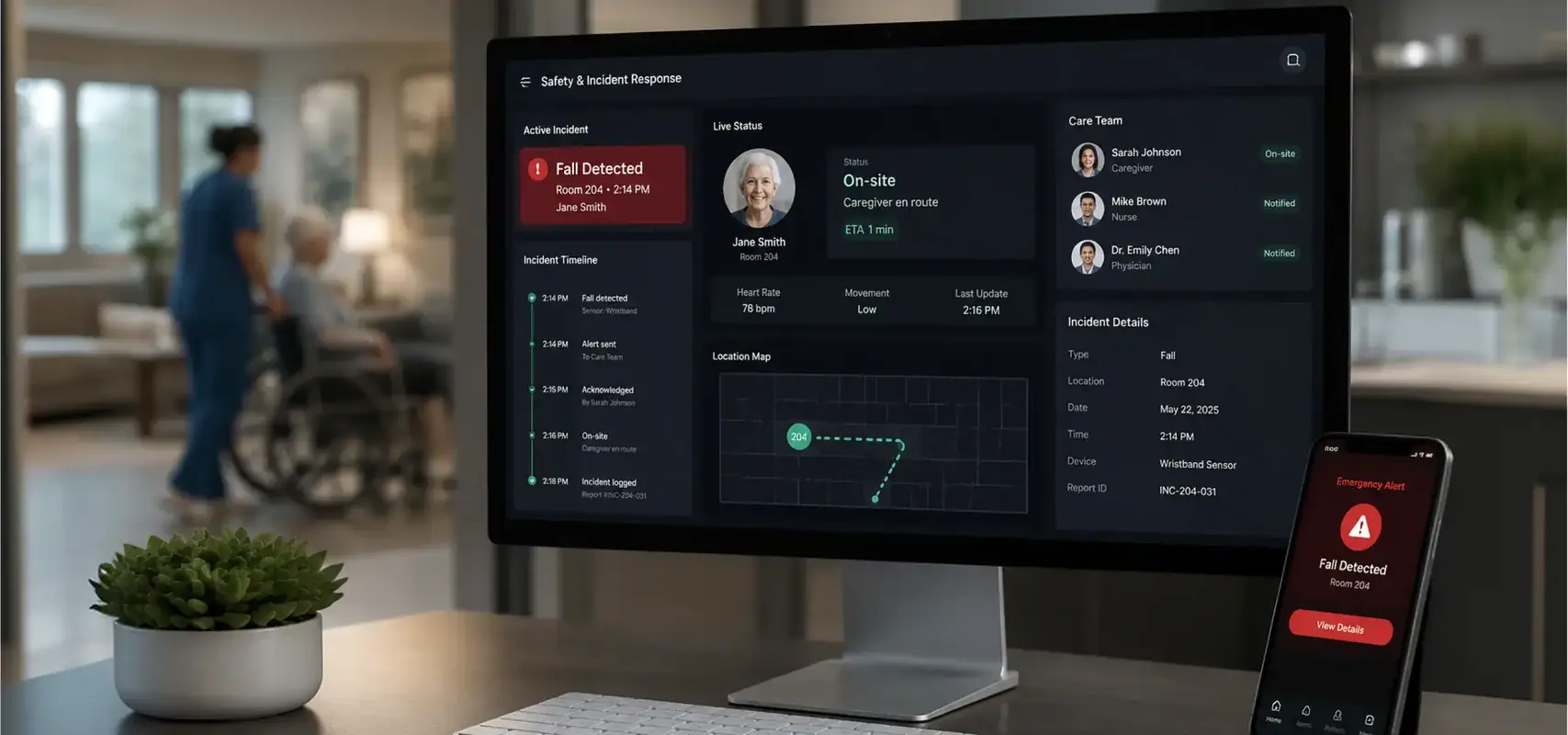
Empeek built a Safety & Incident Response Platform to show how sensor data (a fall, specifically) can turn a full, coordinated workflow, moving far beyond a simple one‑off alert.
The intent was self-directed: prove that a single accelerometer signal can drive:
- confirmation
- escalation
- caregiver notification
- incident logging
as one connected system, for elderly care and remote patient monitoring (RPM) use cases.
Background
Fall detection is one of the most frequently requested capabilities Empeek encounters across RPM clients and prospects, alongside elderly care workflows and accelerometer-based sensing. The client — a digital health organization running an existing RPM program — had wearable-driven monitoring in place but no structured incident-response layer on top of it. When a fall was detected, what followed was manual: a notification, a group message, whoever happened to see it first. No confirmation step, no escalation logic, no record of outcome.
The decision to build a dedicated response platform was driven by both operational and financial pressure. The cost of maintaining and coordinating incident response through fragmented tools had become comparable to the investment required to build a purpose-built solution — making the project straightforward to justify internally.
Client name, project name, and interface details have been anonymized/changed under NDA.
Challenges
Falls are operationally difficult events because detection alone does not resolve the incident. The platform was scoped to fill that gap: not detection itself, but everything that has to happen immediately after a fall is detected — transforming a single event into a structured response process.
Before the platform, alerts could be generated successfully but response coordination remained fragmented across monitoring, communication, and documentation tools.
Three specific failure modes motivated the design.
Missed Alerts
A flat notification with no escalation path depends entirely on the right person seeing it at the right moment. That is risky in a busy care setting, where a nurse covering multiple residents and wings may not notice every alert.
False Alarm Fatigue
Without a confirmation step between detection and escalation, every sensor spike can trigger the same response as a real fall. Over time, staff may start to ignore alerts — and the real ones can get missed too.
No Operational Record
When an incident closes, many systems leave behind only a cleared notification, a message thread, or a manual note if someone remembers to write one. That means key details — whether the fall was confirmed, who responded, and how long it took — are often not captured in a way that supports review or trend analysis.
Process
Rather than building another detection layer, the objective was to demonstrate how incident handling can operate as a connected workflow — where confirmation, escalation, communication, and reporting are part of the same process.
Resident Prioritization and Monitoring Visibility
The workflow starts from the operational dashboard.
Residents are automatically ranked by current status:
- Fall Detected
- At Risk
- Stable
This allows staff to immediately identify who requires attention instead of reviewing residents one by one.
Each resident card shows live sensor data: battery level and last sync time for their SafeBand, so staff can catch a dead or disconnected sensor before it becomes a blind spot.
Incident Detection and Clinical Context Review
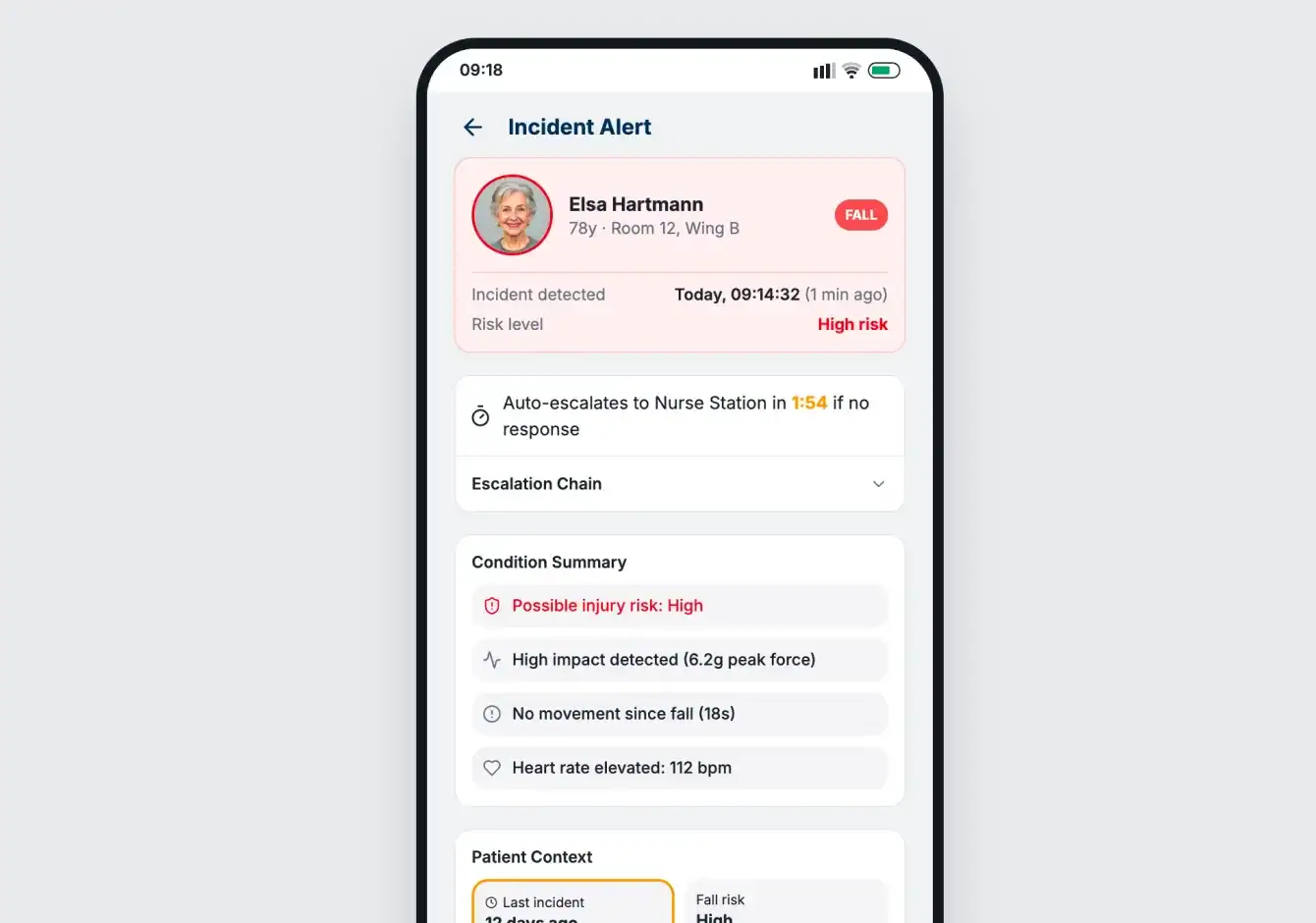
When a fall event is detected, the platform creates an incident and opens the evaluation screen.
The alert is not escalated automatically. Instead, the responder receives contextual information needed to assess the event:
- peak impact force (g-force),
- seconds since last movement,
- current heart rate,
- resident risk profile.
This gives staff enough information to determine whether the incident should move into active response or be closed as a false alarm.
Confirmation and Escalation Workflow
Confirmation acts as the decision point within the process.
If intervention is required, the incident progresses into notification and escalation. If not, the event can be resolved and recorded accordingly.
A visible countdown tracks response time. If no action is taken within the configured window, escalation routes the incident to the nurse station to maintain visibility and reduce the risk of unattended alerts.
Every action taken during the workflow is recorded as part of the incident timeline.
Resolution, Reporting, and Operational Review
Once the incident is closed, the platform automatically generates an incident report.
The report stores:
- event chronology,
- confirmation outcome,
- response actions,
- escalation history.
Incidents remain available for resident-level review over time, allowing teams to track recurring falls, response patterns, and false-alarm frequency instead of treating each event independently.
Who This Is Built For
The platform centralizes alert handling, confirmation, escalation, and reporting in one operational process — reducing manual coordination between monitoring, care, and response teams.
The workflow supports organizations responsible for continuous resident and patient monitoring, including:
- Remote Patient Monitoring (RPM) providers
- Elderly care providers
- Assisted living communities
- Home care operators
- Digital health companies scaling monitoring operations

Who Evaluates This
- Program Directors and Clinical Operations Leads — accountable for missed-alert risk, escalation response times, and staff workload across shifts
- CIOs and VPs of Digital Health — deciding whether alert coordination is a build, a buy, or an integration into existing monitoring infrastructure
- Facility and Practice Administrators — tracking the cost of manual coordination: duplicated calls, unlogged escalations, and reporting assembled by hand
Empeek’s Team Reduces Time to Market by 15%. Start Your Project Today.
Schedule a CallOur Custom Healthcare Software Development Services
FAQs
How does the platform differ from standard fall detection solutions?
The platform focuses on what happens after detection. Instead of generating a standalone alert, it connects confirmation, escalation, caregiver notification, incident logging, and reporting into one response workflow.
How does the platform help reduce missed or unattended incidents?
Prioritization and escalation keep incidents visible until action is taken. If an alert is not acknowledged, it is automatically routed to the next response layer.
How are false alarms handled?
A confirmation step sits between detection and escalation. Staff review sensor inputs and resident risk factors before closing the event or initiating response.
Can the platform work with existing Remote Patient Monitoring (RPM) programs?
Yes. The workflow — confirmation, escalation, notification, reporting — is device-agnostic at the architecture level. Extending it to other wearables or non-wearable home monitoring inputs is a scoping question, not a structural constraint.
We already have fall detection. Why do we need this on top of it?
Detection generates an alert. SafeGuard [name is changed due to NDA] handles everything after that — who sees it, who responds, what happens if they don’t, and what gets recorded when it closes. Most detection layers produce a notification. They don’t produce a confirmation step, a named escalation chain, or an incident record with outcome status.
Our staff already coordinate through messaging apps. What does this replace?
A messaging thread has no escalation logic, no automatic routing if someone doesn’t respond, and no structured outcome record. When a shift ends, that context disappears. SafeGuard [name is changed due to NDA] replaces ad-hoc coordination with a process that runs the same way regardless of who is on shift.
 (No Ratings Yet)
 Loading...